
Bookings Workspace Integration for PhoneOS
Overview
This guide explains how to build a workspace integration that manages meeting bookings on Cisco PhoneOS devices. Unlike the RoomOS implementation, PhoneOS (latest 3.6) supports local calendar workspaces only—there is no hybrid calendar connectivity yet. All booking interactions therefore occur directly between your integration and the devices via PhoneOS cloud xAPI.
If you are migrating from the RoomOS workflow, keep the overall architecture but remove any logic that expects hybrid calendar acknowledgments. The PhoneOS devices immediately reflect successful commands as local calendar updates.
Before you start
- Review the PhoneOS xAPI surface at https://phoneos.cisco.com/xapi.
- Ensure your integration is authorized to call the
BookingsxAPI namespace for the target workspace. - Plan to persist correlation identifiers (
BookingRequestUUIDandMeetingId) so you can match asynchronous events to the user actions that triggered them.
Supported xAPIs on PhoneOS
| Type | xAPI | Purpose |
|---|---|---|
| Command | xCommand Bookings Book | Create a new booking. |
| Command | xCommand Bookings Delete | Remove an existing booking by BookingRequestUUID. |
| Command | xCommand Bookings List | Retrieve the current booking list for the workspace. |
| Event | xEvent Bookings BookingCreated | Confirms a booking was created; includes MeetingId and BookingRequestUUID. |
| Event | xEvent Bookings Start | Indicates a booking has begun. |
| Event | xEvent Bookings End | Indicates a booking has ended. |
| Event | xEvent Bookings Deleted | Confirms a booking was deleted. |
| Event | xEvent Bookings SyncRequired | Signals that the integration must refresh bookings via Bookings List. |
| Status | xStatus Bookings Availability | Indicates the booking status of a device and the related time if bookings exist. |
| Status | xStatus Bookings Current | The ID of the current active booking event. It's empty if no booking is in progress. |
Note: Commands such as
Bookings Edit,Bookings Extend, or hybrid calendar callbacks are not available on PhoneOS yet in 3.6. Keep your command set limited to the entries above.
Local calendar flow
Because PhoneOS supports only local calendars, every booking change is applied immediately on the device and synchronized across devices in the same workspace. The device responds to each command with an event so that your integration can verify success and update its own data store.
Creating a booking
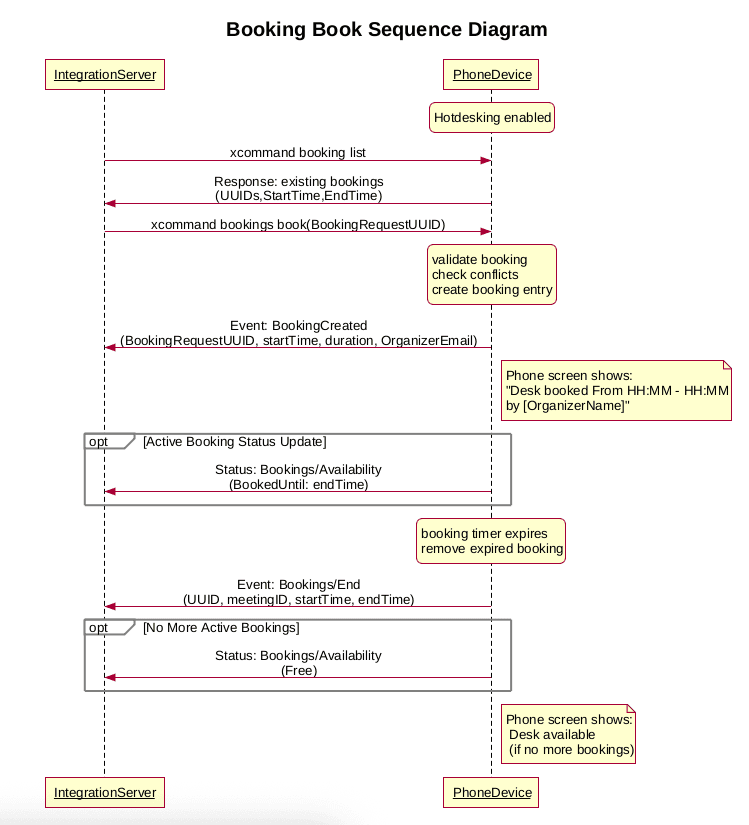
- Generate a unique
BookingRequestUUIDfor the new booking and callxCommand Bookings Bookwith the desired start/end times and participants. - Listen for
xEvent Bookings BookingCreated(success) orxEvent Bookings Deleted(failure cleanup). On success, persist the returnedMeetingIdfor future reference. - If your integration misses the
BookingCreatedevent (for example, due to network issues), usexCommand Bookings Listto reconcile and re-sync bookings.
Deleting a booking
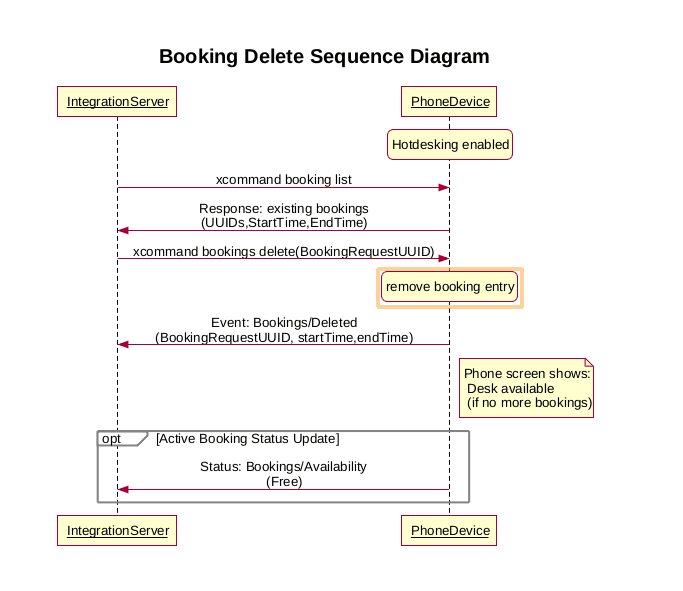
- Call
xCommand Bookings Deletewith theBookingRequestUUID. - Await
xEvent Bookings Deletedto confirm removal. If the event does not arrive promptly, issuexCommand Bookings Listto verify the booking state.
Synchronizing calendar data
- Monitor
xEvent Bookings SyncRequired. When it fires, the device is telling you that its local cache may be out of date. - Immediately call
xCommand Bookings Listand reconcile the returned bookings with your records. - Consider scheduling periodic
Bookings Listcalls to guard against missed events.
Start and end notifications
xEvent Bookings Start and xEvent Bookings End allow your integration to trigger notifications, analytics, or room preparation workflows. Tie these events back to the booking using the MeetingId provided with each event.
Handling error scenarios
- Conflicting bookings:
xCommand Bookings Bookfails implicitly if the requested slot overlaps an existing booking. Detect this by checking the response payload or by monitoring for the absence ofBookingCreatedand the presence ofSyncRequired. - Device restarts or connectivity loss: Expect a
SyncRequiredevent after the device comes back online. Always reconcile withBookings Listbefore accepting further user actions. - Missing events: Maintain a retry policy—if no confirmation event arrives within a reasonable window, refresh with
Bookings Listand retry or alert the operator.
Additional resources
- PhoneOS xAPI Explorer — live schema and documentation.
- RoomOS Bookings — RoomOS device bookings integration guide.