
PhoneOS Website Release Notes
The PhoneOS website (phoneos.cisco.com) is the official development portal for Cisco IP Phone devices running PhoneOS, providing comprehensive documentation, tools, and resources for third-party developers and integrators.
Website Version 1.0.0
Release Date: November 2025
Overview
The initial release of the PhoneOS website introduces a modern, interactive development portal designed specifically for xAPI integration developers. This platform provides comprehensive documentation, intelligent search capabilities, practical code examples, and community support to accelerate PhoneOS application development and integration workflows.
Key Features
1. xAPI Documentation Browser
An interactive, version-aware documentation browser that provides complete xAPI reference documentation across different PhoneOS releases.
Release Version Selection
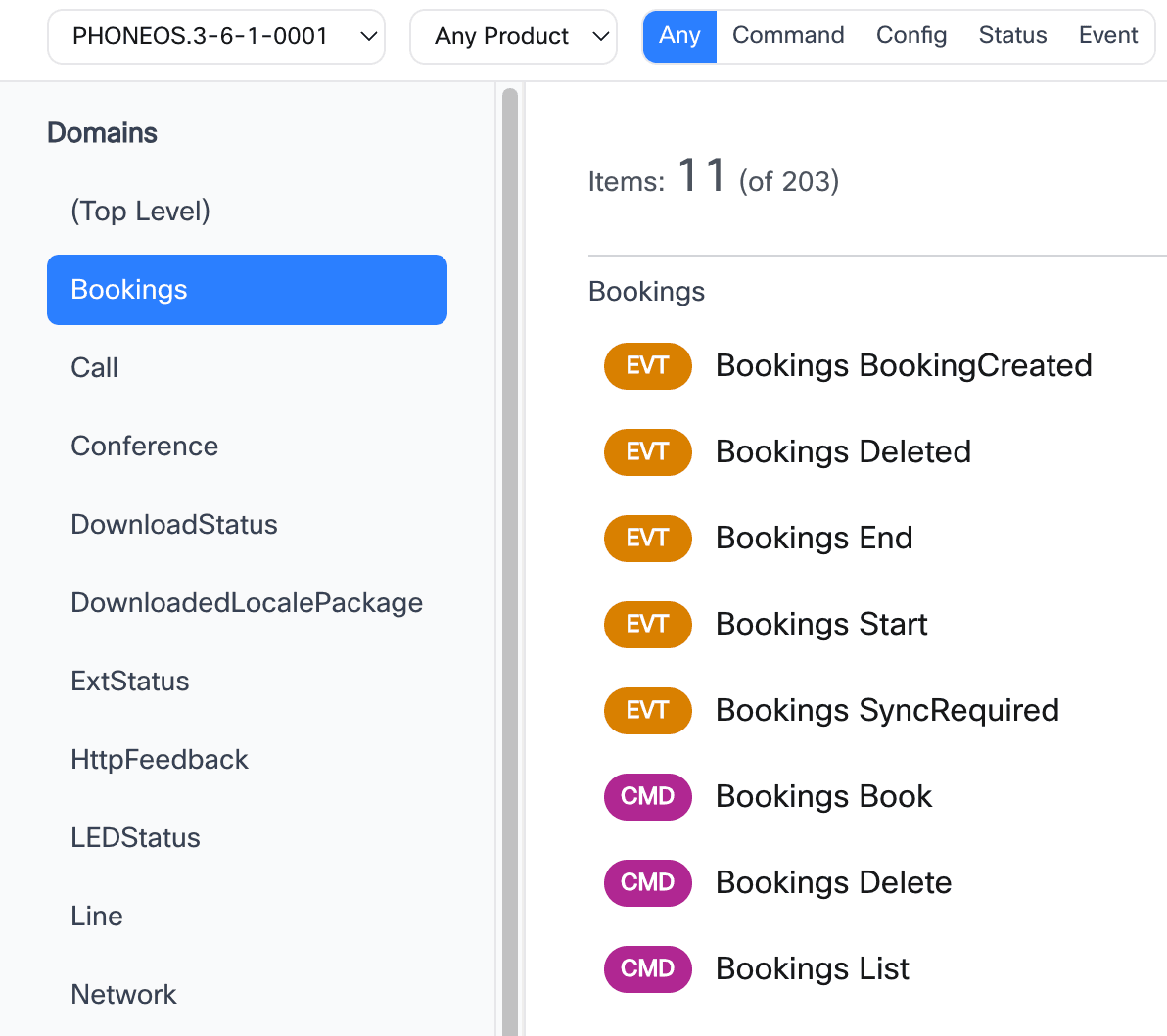
Select a specific PhoneOS version to view the xAPI documentation. xAPI is available in PhoneOS 3.5 and later versions.
Hierarchical API Organization
The xAPI framework is organized into clear functional domains, making it easy to find the right APIs for your use case. Each API belongs to one of the following categories:
- Command APIs – Perform device control operations
- Status APIs – Check or monitor the current state of the device
- Configuration APIs – Manage device settings (coming soon)
- Event APIs – Receive real-time updates and notifications
All APIs are further organized into functional domains — including System, Network, Call, and Security — to simplify discovery and navigation.
Advanced Filtering
Quickly narrow down APIs based on multiple criteria:
- Filter by API type (Command, Status, Config, Event)
- Filter by product model (9841, 9851, 9861, 9871, 8875)
- Filter by backend deployment (Cloud, On-Premises, OpenSIP)
Deep Search
Keyboard Shortcut: Cmd+K (Mac) / Ctrl+K (Windows/Linux)
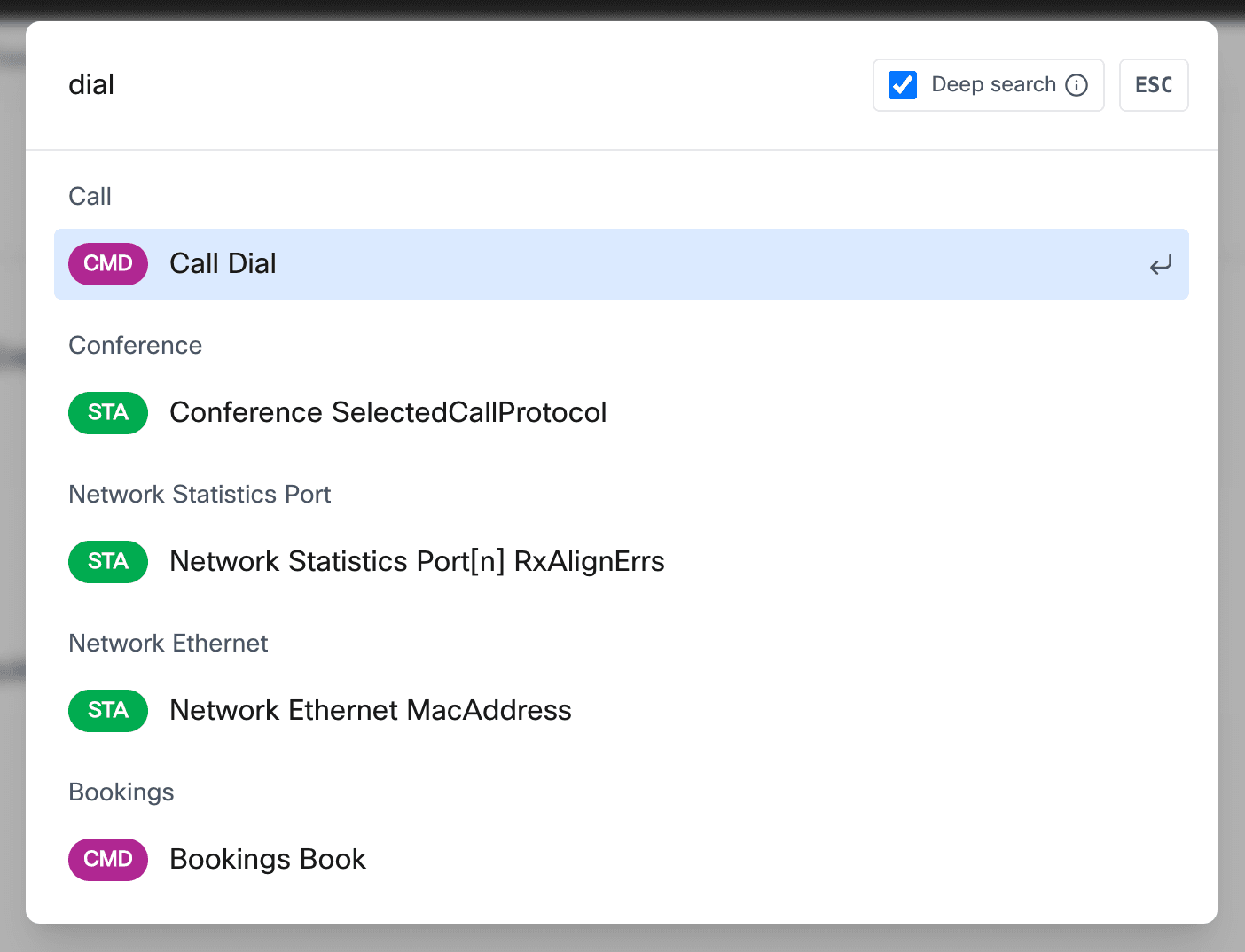
A fast, fuzzy-search–powered discovery tool helps developers quickly locate specific xAPI commands, statuses, and events. It streamlines navigation across the entire API surface with features such as:
- Real-time search results as you type
- Fuzzy matching to find APIs even with partial or misspelled queries
- Preview of API path and type before navigation
- Full keyboard navigation for efficient browsing
Example searches:
- Search "dial" to find
xCommand Call Dial - Search "network ip" to locate network-related status items
- Search "boot" to discover boot-related events and commands
Comprehensive API Details
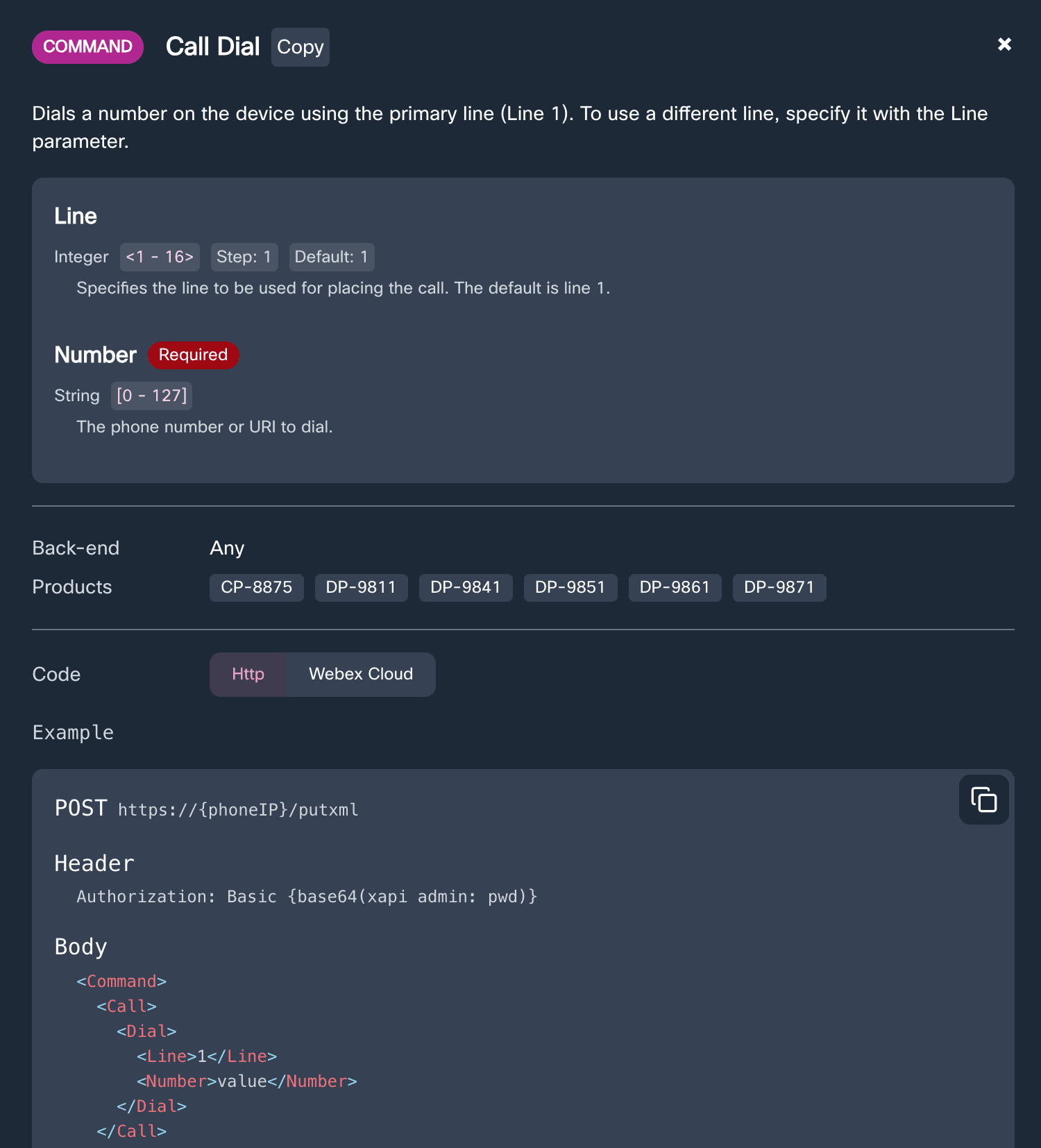
Each xAPI includes detailed reference information to help developers understand and integrate efficiently:
- API type, full path, and description
- Supported products and backend compatibility
- Parameter documentation for commands (required/optional, value specifications, defaults)
- Value space information for status items
- Event schema for event APIs
- Multi-format code examples (HTTPS, Webex Cloud API)
- One-click copy for URLs and code snippets
Code Examples
Production-ready code examples are auto-generated for each API in multiple formats:
HTTPS Direct Integration:
curl -X POST https://{phoneIP}/putxml \
-H 'Authorization: Basic {base64(xapi admin: pwd)}' \
-H 'Content-Type: text/xml' \
-d "<Command>
  <Call>
    <Dial>
      <Number>5000</Number>
    </Dial>
  </Call>
</Command>"
Webex Cloud API Integration:
POST https://webexapis.com/v1/xapi/command/Call.Dial

{
  "deviceId": "Y2lzY29zcGFya.....S9mb29iYXIv",
  "arguments": {
    "Number": "5000"
  }
}
2. Guides and Documentation
Comprehensive guides and documentation covering PhoneOS features, release notes, and development topics.
Available Content:
- What's New - Release notes for PhoneOS and xAPI updates
- Technical Documentation - In-depth guides on PhoneOS features and capabilities
- FAQ - Frequently asked questions about PhoneOS and xAPI
3. Examples and Integration Samples (coming soon)
A dedicated section for integration examples and sample code to help developers get started quickly.
Note: Example content is coming soon. This section will feature:
- Code samples for common integration scenarios
- Step-by-step integration tutorials
- Best practices and design patterns
4. Developer Resources
Curated resources to support PhoneOS development and integration:
Product Information:
- 8875 Data Sheet - Cisco Video Phone 8875 specifications
- 9800 Data Sheet - Cisco Desk Phone 9800 series specifications
- 9800 Help Documents - End-user help for Cisco Desk Phone 9800 series
- 8875 User Videos - User training videos for Cisco Video Phone 8875
Developer Tools:
- DevNet Sandboxes (coming soon) - Book and try devices remotely
- Postman Collection (coming soon) - Collection of API examples
- Webex for Developers - Webex API reference documentation
5. Community Support
Multiple channels for getting help and connecting with the PhoneOS developer community:
Webex Teams Space
Join the xAPI Devs & Integrations space on Webex for quick replies from Cisco developers and experienced integrators.
Cisco Tech Community
Participate in web-based forum discussions on community.cisco.com for IP telephony and phones.
6. Integrated Feedback System
Built-in feedback mechanism on every page allows users to:
- Report bugs and issues
- Request new features
- Share integration success stories
- Suggest improvements
Feedback is sent directly to the PhoneOS development team via Webex Teams for quick response and action.
Supported Device Models
xAPI documentation and resources are applicable to the following Cisco IP Phone models:
- 8875 - Cisco Video Phone 8875
- 9841 - Cisco Desk Phone 9841
- 9851 - Cisco Desk Phone 9851
- 9861 - Cisco Desk Phone 9861
- 9871 - Cisco Desk Phone 9871
Device compatibility information is displayed in the details panel for each API.
Version History
| Website Version | Release Date | Highlights |
|---|---|---|
| 1.0.0 | November 2025 | Initial release with xAPI documentation browser, guides, resources, and community support |